

-
 Scanner
+
Scanner
+
 ‹
‹ ›
›


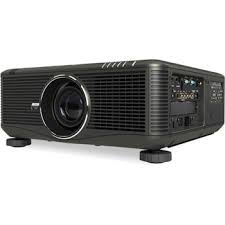
Projection of large images with a high brightness of 8000 lm (with PX800X)
 Achieves high brightness of 8000 lm through the use of a two-light lamp system. Capable of projecting clear images even onto large screens. Supports high brightness projection equivalent to a maximum of 32000 lm*¹ via a stack installation and using a dedicated software*².
*1 When using four projectors of PX800X. This will vary depending on factors like the installation environment.
*2 The "Stacking Correction Tool" utility software is needed to carry out this function.
Two types of six segment colour wheels that can be chosen to suit the purpose
 Exchangeable colour wheels that suit the type and colour shade of the projected image. The 6 segment white*1 wheel is suitable when the emphasis is on brightness, while the 6 segment colour*² wheel is suitable when focusing on the colour shade.
Wide range of input/output terminals such as HDMI and DisplayPort
Cinema quality video using Hollywood Quality Video processing
HD-like vivid and crisp DVD images can be projected through Hollywood Quality Video which excels at following points and enrich your cinematic experience.
- Random and Mosquito Noise Reduction
- Video and Film Cadence Detection (3:2 and 2:2 pull down)
- Per-pixel Motion Adaptive Deinterlacing
- Detail Enhancement
- Full 10-bit processing, scaling and warping
- 3 : 2 Pull down Detection
- Diagonal Interpolation to remove "jaggies"


WUXGA (1920×1200) panel compatible with full HD displays*
Utilises a high resolution WUXGA panel that enables the reproduction of even high-quality full HD content in its original beauty.
*with PX750U
Wide range of input/output terminals such as HDMI and DisplayPort
 Equipped with a wide range of input/output terminals and compatible with a variety of image sources such as DisplayPort, which lets you connect the projector from about 15 meters away with minimal signal decay, as well as computer (analogue), 5-core BNC, HDMI, video, and S-video.
Achieves colour reproducibility by 10-bit colour processing (for roughly 1.07 billion colours)
Lens shift function allows you to adjust the screen position even after installation
By using the electric lens shift function, you can adjust the position of the projected screen up and down, and from side to side even after installation.
Supports dual layers stacking
Stacking to two layers can be facilitated by using the supplied columns. In this case, 16000 lumens* of high brightness projection is available.
*with PX800X
360° installation angle (tilt-free) that enables vertical projection

Lens memory function can adjust image to a preset memorized position using the inbuilt signal table even if the signal input changes
*NP06FL does not support the Lens memory function.
*PX700W/PA800X : Only the lens shift position data can be stored except for NP06FL.
*PX750U : The zoom position data and the lens shift position data cannot be stored in case of NP16FL.
Seamless switching
When the input is switched, the image displayed before switching is held so that you can see smooth image changing without black image.
 *for PX750U only.
Capable of high brightness projection equivalent to a maximum of 32000 lm via a stack installation*¹
 Supports stack installations whereby you can project by lining up as many as four projectors up and down or side to side.*² When projecting with multiple projectors, even in cases where people or objects obstruct the front of a projector or when problems occur with one of them, since the same screen is projected by the other projectors, there is no interruption in the image. Even adjustment operations for stack installation can be performed easily with the adjustment cameras and specialized software.
*1 When using four projectors. This will vary depending on factors like the installation environment.
*2 The "Stacking Correction Tool" utility software is needed to carry out this function.
